You may remember a previous Paywall Bypass Guide I made a few years ago. The extension it was predicated on no longer exists on most browsers, so I decided to make my own (!), with less steps and an accidental improvement.
The Sorry I'm Poor browser extension will allow you to bypass specific kinds of article paywalls- the type where they give you a taste of the first bit: you can see the title and first paragraph, but as you scroll further, something pops up, drops down or otherwise blocks your view, sometimes saying you've reached your free article limit and always asking you to kindly subscribe to read more. Basically, if at first it looks like it could have been free-to-read, this browser extension is likely to liberate it.
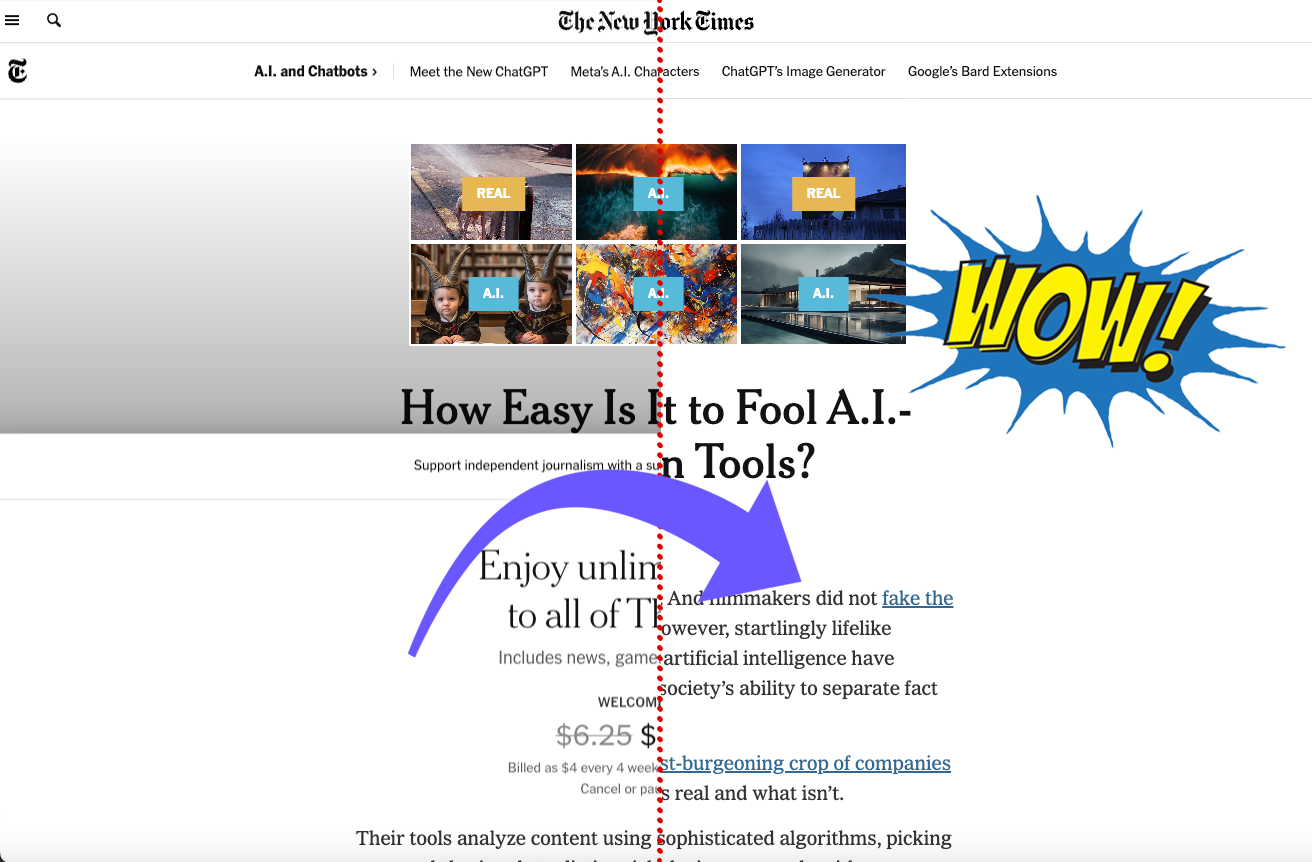
If youre interested you can read how it works in the old Paywall Bypass Guide, and there is also an explanation in the readme file I've included. This page is for getting you set up with the new extension. I mentioned that the new version is easier- in practice it is, but setting it up requires like, two more steps.
Why did I do it this way?
Installation
Step 0
Download the extension below and unzip it.Step 1
Open your web browser - must be Chrome or Chromium-based (which most are)Basically, this won't work for Safari or Firefox, but it will work for Google Chrome, Opera, Brave, Vivaldi, Microsoft Edge and any of these.
Please note for the following examples I will be using screenshots taken from Opera, so your browser might look slightly different.
Step 2
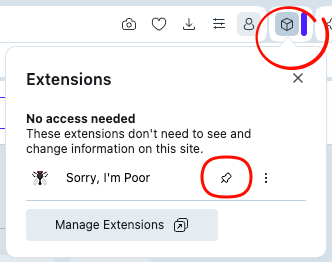
Open the Extension Settings menu. This is usually represented by a little puzzle piece or a cube icon next to the address bar.From the drop-down, hit Manage Extensions (at the bottom of the menu, next to the gear icon).
Step 3
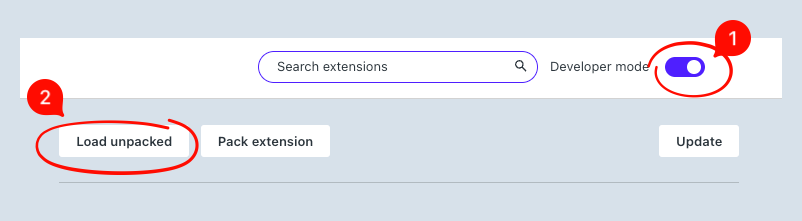
Toggle on Developer Mode, which should be in the top right-hand corner, next to the Extensions search bar.
Step 3.5
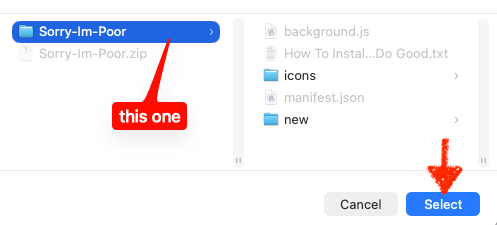
From there, find the Sorry-Im-Poor folder you unzipped and select it. You should then see the following in your list of extensions:
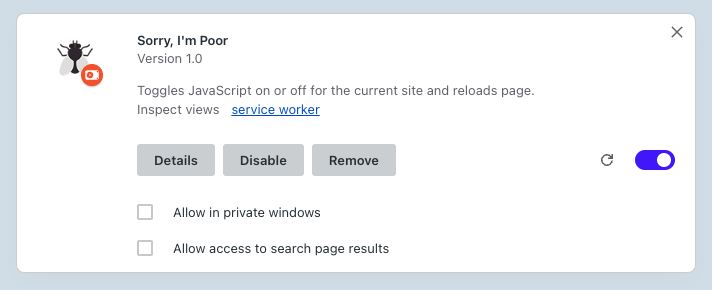
Toggle on the toggle if it's not already toggled. Then pin the extension (so you can see the little fly icon in the extension tray next to the address bar). You might have to do this through the same extension menu from earlier that appears when you click on the little cube or puzzle piece icon. The fly icon should now be visible.
Do you feel like a fucking hacker?
>You are. So L33t.
~→ >>Download File<< ←~
How to Use
Step 0
Open an article you want to read but got cybercockblocked by the man.Step 1
Press the Fly!
The letters 'OFF' should appear in red, indicating Javascript has been turned off.
Step 1.5
If you want to turn Javascript back on for whatever reason, press the fly again. The extension should remember your preference for the whole site.Where Does it Work?
Confirmed site list:- scientificamerican.com
- nytimes.com *
- newscientist.com
- economist.com
- fortune.com
- sfchronicle.com
- dailymaild.com
* this is where we get back to that "accidental improvement" I mentioned at the beginning. Sometimes the original extension I was using would trigger a "Please enable JS and turn off your ad-blocker" message before the article would even load. Since my version is so bare bones, it doesn't register as an ad-blocker (because it isn't one). So while the original UBlock Origin extension was eventually defeated by nytimes, I am able to view articles like this one using Sorry Im Poor, so long as I am not also running an ad-blocker.
How to Sleep at Night ☾ Zz
It is not beyond me that if someone has produced an article that other people find value in, they should be compensated for their work (hence the 'Sorry' in 'Sorry, I'm Poor').However, after doing some research, I found the overwhelming majority of sites with this subscribe-to-read-more model (I couldn't find a single counter-example), do NOT pay their writers more based on readership. You can look at this two ways:
- where someone who produces consistently excellent work, driving traffic and subscriptions to the site is paid the same if they produced mediocre content; or
- not paying per-click disincentivizes journalists from producing click-bait.
So I think this already helps with the ethical calculus. There's also arguments that information should be free, and being poor should not exclude you from cultural enrichment. That being said, we should still support human insights over AI summaries and media organizations that cover topics we value. To do this, I recommend that whenever you use the extension, if the article turns out to be a banger, support the author or the platform by:
- Sending the article to friends or europeans that might be interested (assuming their first read is free).
- Post the article to a relevant sub-reddit - this one really helps with engagement since search engines give positive shine to reddit posts
- Find the author's socials (most journos have twitter/substack or decentralized alternatives like mastodon or bluesky) and give them a follow.
Any of these steps are a decent exchange for reading an article you didn't pay for. I am hoping future versions of this extension will include a way to automatically facilitate the above steps.
Want to Help?
Leave a comment telling me any sites you found worked with the browser extension! Other comments like issues can also be reported here. This tool will not work 100% of the time, this is why I kept trying to explain the type of articles it could work for. So to that end, I don't really need reports for the sites it didn't work on. Thanks!
I used Shottr, a free, snazzy screenshot + markup utility for Mac made by a one person team.
Icons used for this project are modified versions of assets created by user juicy_fish on flaticon.com